
Skip to content
Features Client Records
Luma · The connected client record

One client. The context that belongs together.

Sessions, notes, assessments, forms, documents and billing, connected around the person. Give clinical and administrative work a shared home without flattening everything into one long, crowded page.

Part of your AI-first mental health EHR
One person. Their connected history.

Inside the current PractaLuma workspace

PractaLuma / Client record
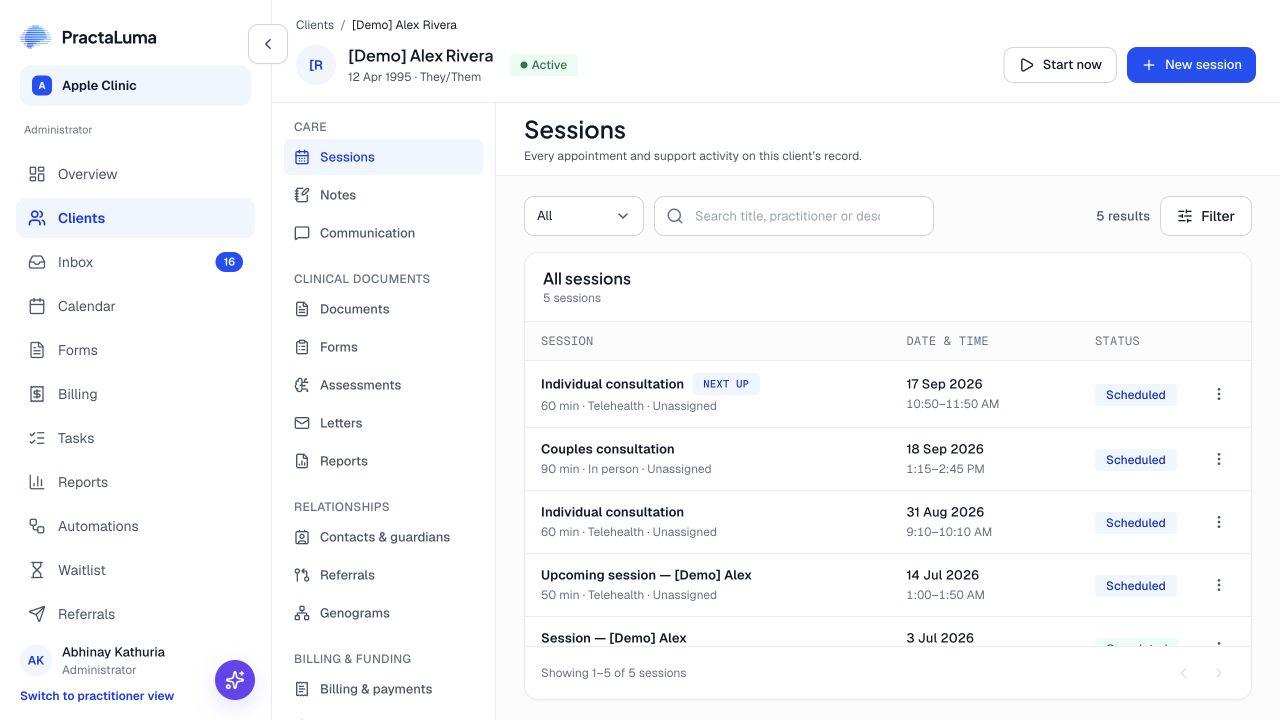
Actual PractaLuma /luma demonstration client record, showing Alex Rivera’s sessions and clinical workspace navigation.
The record at the centre of the workActual product screen · /luma
01 / Begin with the person

Keep the practical details close.

Find client details, contacts and relevant relationships from the same record. The team can orient itself before moving into the clinical or administrative work it needs to do.

  • Client details and identifiers
  • Contacts and relationships
  • Referrals and supporting context
02 / Follow the clinical history

A place for each kind of information.

Move between session notes, general notes, assessments and documents. Each has its own useful structure, while remaining part of the same client context.

  • Session and client notes
  • Assessment results and trends
  • Forms and document history
03 / Connect the practical work

The appointment and invoice belong here too.

Review sessions, invoices and plan information alongside the client. Start the next workflow from a record that already tells you who the work is for.

  • Appointment history
  • Invoices and payment context
  • Session and funding plans
THE EVERYDAY WORKFLOW

From first step
to what’s next.

01

Find the client

Open the record and check the identifying details.

02

Choose the context

Move to the relevant notes, sessions, assessments, documents or financial information.

03

Continue the work

Create or review the next item with the client context already in place.

A LITTLE MORE CONTEXT

Good questions.
Clear answers.

Talk it through with us
Is everything displayed in one long timeline?

No. The record uses dedicated areas for different kinds of work so you can find sessions, notes, documents, assessments and financial information without one overloaded view.

Are general client notes separate from session notes?

Yes. Session notes belong to an appointment; general client notes can capture other relevant information such as a phone call or administrative interaction.

Does every team member see the same client information?

Access depends on practice roles, permissions and assignments. A connected record does not mean unrestricted access for everyone.

MEET PRACTALUMA

A little less admin.
A little more room for care.

Explore Client Records in the context of your whole practice.

Book a personal walkthrough Or get started