
Skip to content
Features Clinical Notes
Luma · Clinical notes

A record of the work. Written in your voice.

Keep session notes and the notes between sessions in the right place. Write directly or use an AI draft, then review the wording with the appointment and client context close by.

Part of your AI-first mental health EHR
Notes, with the record around them.

Inside the current PractaLuma workspace

PractaLuma / Client notes
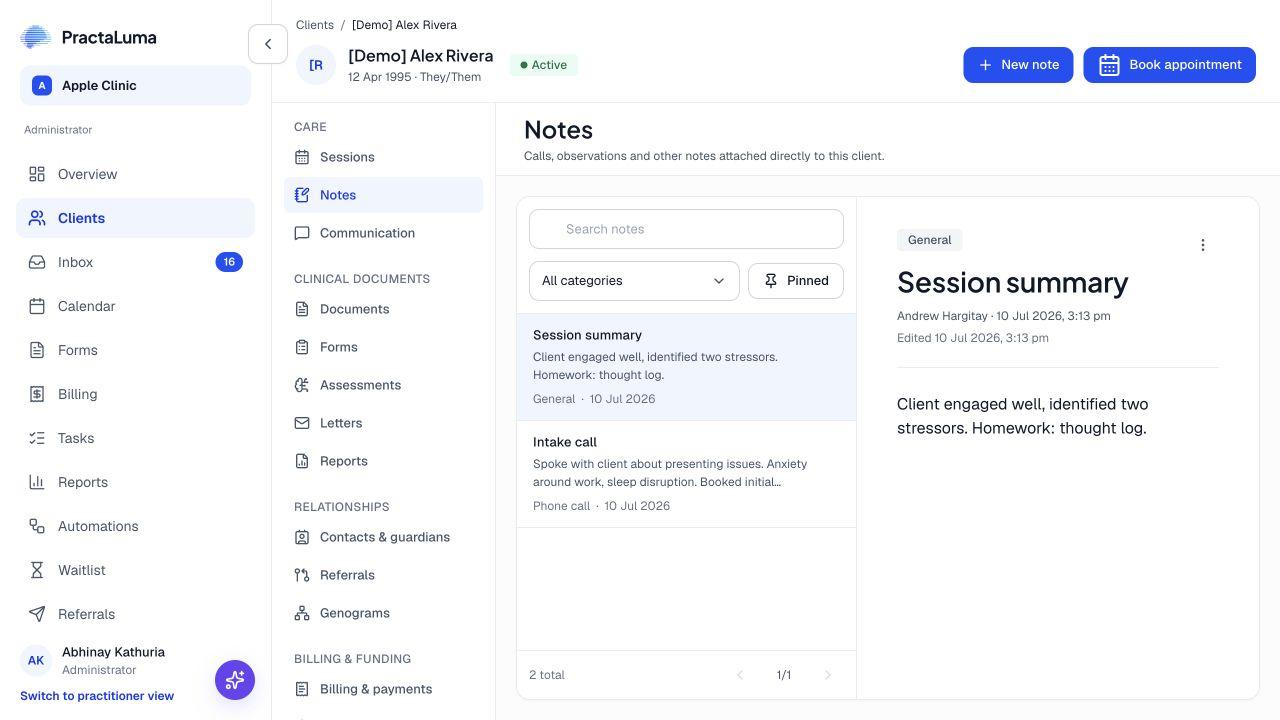
Actual PractaLuma /luma general Notes view for demonstration client Alex Rivera. This is not AI-generated output.
Rough notes · AI draft · transcriptActual product screen · /luma
01 / Start the way you work

A blank page is not the only option.

Work from rough notes, a template or an AI-generated session draft. Keep the transcript available as source material when it exists, rather than losing it behind the polished version.

  • Rough session notes
  • Template-based AI drafting
  • Separate transcript view
02 / Keep the distinction clear

Not every note belongs to an appointment.

Record a phone call, observation or administrative interaction as a client note. Keep appointment-based notes with their session and use categories and pinning for the wider client record.

  • Session-linked notes
  • General client-note categories
  • Pinned client notes
03 / Return to the context

The next session starts with what you know.

Find earlier notes from the client record and open the appropriate session workspace to edit. Documentation remains connected to the person and appointment it describes.

  • Client note history
  • Appointment context
  • Editing in the relevant workspace
THE EVERYDAY WORKFLOW

From first step
to what’s next.

01

Choose the note type

Start a session note or a general client note according to the interaction.

02

Write and review

Compose the note yourself or work from a draft, checking the details.

03

Return when needed

Find the note with the client or session it belongs to.

A LITTLE MORE CONTEXT

Good questions.
Clear answers.

Talk it through with us
What is the difference between a session note and a client note?

Session notes belong to an appointment and can include rough notes, an AI-generated note and a transcript. Client notes capture other information, such as phone calls, observations or administrative interactions.

Can I keep writing notes without AI?

Yes. Manual notes remain part of the workflow. AI drafting is an optional way to prepare text for your review.

Can I edit a session note from the client's note list?

The client record provides the note and session context. Session-note editing takes place in the relevant session workspace.

MEET PRACTALUMA

A little less admin.
A little more room for care.

Explore Clinical Notes in the context of your whole practice.

Book a personal walkthrough Or get started